The “Edit your orders” window opens from a routing’s send button, in Expert mode. At the top, a text preview tells you what will happen, for example “Programmed until 14:30, then TWA 150° held” or “Last waypoint reached around 18:10”. The “Map” button folds the window into a banner to free the map; “Orders” opens it again. “Dismiss” gives up and “Send” sends the orders to VR.
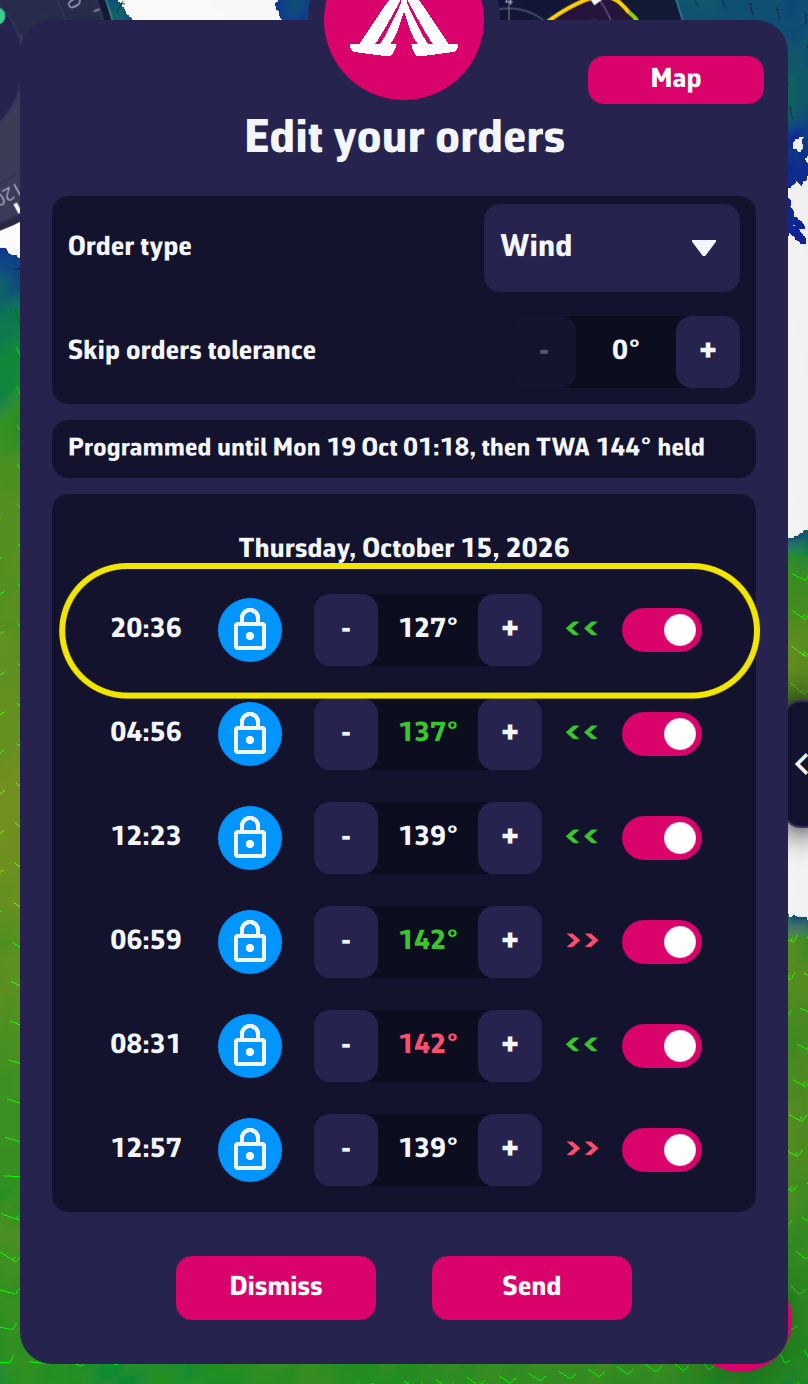
Wind type
- The time of the order is on the left.
- The padlock is closed and blue: we are in Wind type.
- The angle (150° for example) is the wind angle. The numbers are green when close to the best VMG angle (the best speed made good towards or away from the wind). They are red when the angle is tighter than the best upwind angle, or wider than the best downwind angle. Otherwise they are white.
- The arrows next to the angle show the tack: green “«”, the wind comes from the right, we are sailing on starboard; red “»”, the wind comes from the left, we are sailing on port.
- The switch on the right: on, the order will be sent; off, the order will be ignored.
Compass type
- The padlock is open and light-colored: we are in Compass type.
- The angle (72° for example) shows the heading to follow.
- The arrows and the switch read as in Wind type.
Waypoints type
The line shows “WP1 · Lat: … Lon: …”, the coordinates of the waypoint, followed by the switch. The routing is sent as a series of waypoints. This is the best choice for tricky passages, along the coast or close to exclusion zones. Switching a waypoint off shows on the map what the route becomes without it.
Auto type and Manual type
“Auto” fills the list with the type it considers best; the lines read as above. In “Manual”, the list fills as you place points on the map, with the TWA / COG / WPT selector and the “Undo last point” button. The “Mixed” type of earlier versions no longer exists.
Note
Routing has its limits. If the wind is weak and highly variable, it is very difficult to send coherent orders. Wind type is hazardous because if the timing isn’t right (wind shifts earlier or later than predicted), you run the risk of being blown off the initial course. Compass type ensures you head in the right direction, but it won’t be optimal. The best solution, though not easy to implement, is to send your orders as Wind type and then go into VR to observe the predicted route and edit it by hand.
To go further: Orders.