Q1: What happens when a sail is changed in automatic mode?
When changing from one sail to another, there is a wind speed threshold (TWS) which determines when the new sail becomes faster than the old one. At this threshold (TWSc), the boat reaches a reference speed (BSc).
Q2: Why doesn't the sail change immediately when the new one is faster?
To avoid unwanted sail changes, the system only switches to the new sail when the boat's speed exceeds the reference speed by a factor of 1.4% (BSc x 1.014). This factor is called the “overlap factor”.
Q3: What is the “boost effect”?
The boost effect occurs between the moment when the boat's speed reaches the reference speed and when it exceeds the recovery factor. During this range, although the new sail is faster, the boat is still moving forward with the old sail, but at the speed of the new one. This creates a temporary performance boost.
Q4: Why is it beneficial to sail in auto sail mode?
In auto sail mode, the boost effect is applied, giving the boat a temporary advantage. In manual mode, this effect is not present, making automatic mode more advantageous for maximizing speed. However, in some situations, it may be advisable to temporarily deactivate the Auto-sail mode in Virtual Regatta.
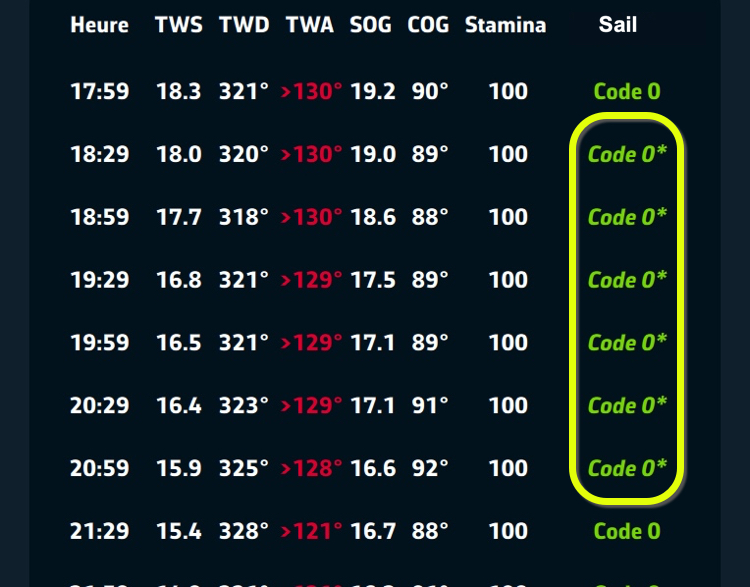
Q5: How can you tell if you're about to go into boost mode?
A star* is displayed at the right of the sail in the routing table..
Q6: What to do if you see this star*?
As a precaution, to avoid untimely sail changes, you can decrease or increase the wind angle (TWA) to exit this zone. For example, if the routing table indicates: TWA 110° Code Zero *, you can change the order to 108°.
If the Routing table shows a succession of sails with this asterisk on a course, it may be advisable to temporarily disable the Auto-sail mode in Virtual Regatta to avoid the risk of multiple sail changes due to possible wind variations. Read blog post about AEZ.