eSail4VR Guide
Version 2.0.178 · October 15, 2026
This guide describes eSail4VR feature by feature. Each page starts with the essentials (what the feature is for and the gestures to know), then goes further: every setting, special cases, how it works.
The beginner path only shows the pages needed to get started; the expert path gathers the whole guide, including the app’s Expert mode (isochrones, pivot points, following the course). For a specific question or a problem, see the FAQ.
Discover the interface
Click the numbered dots to discover each area of the eSail4VR screen.
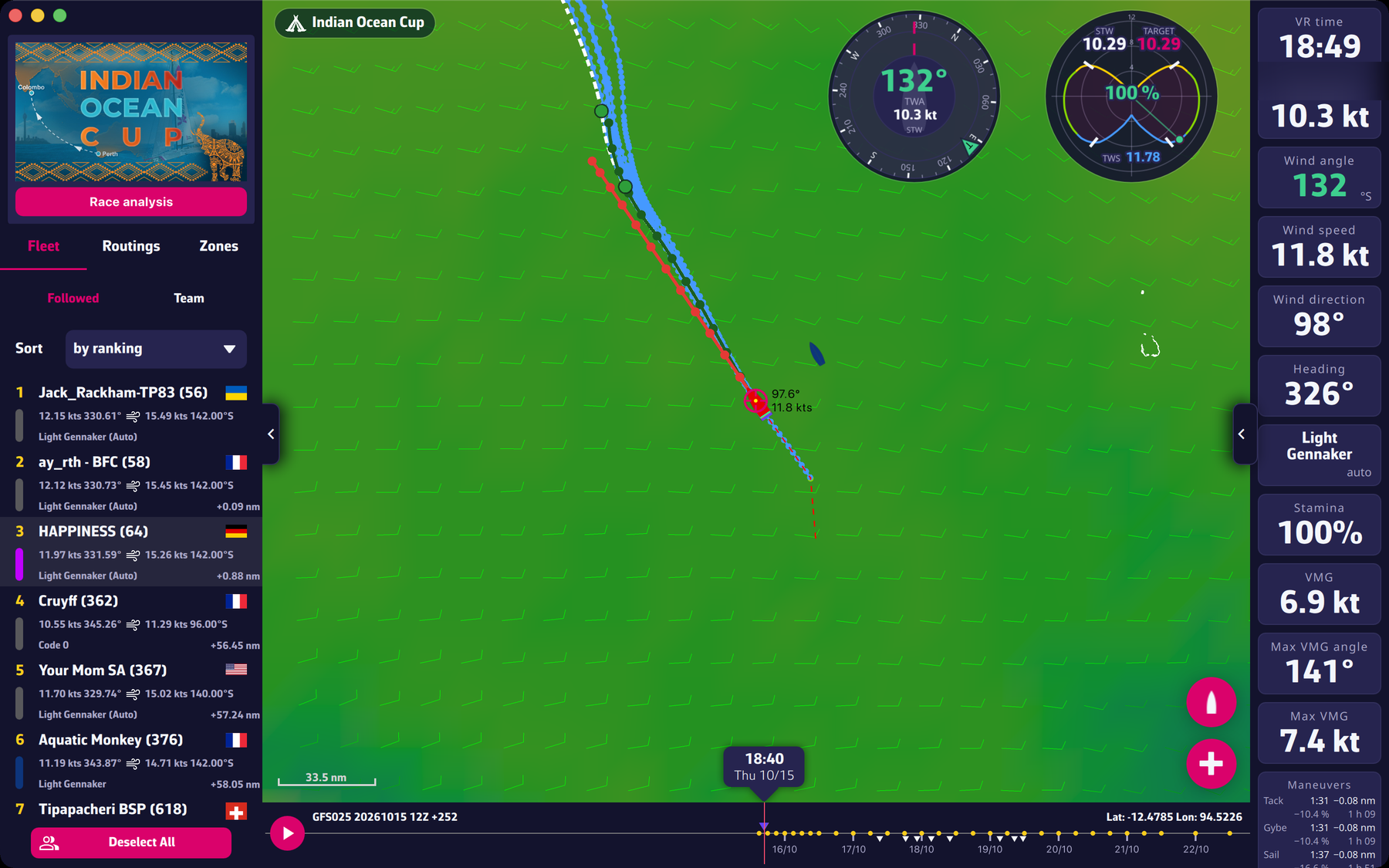
- The map. in the centre: the globe with the weather, your boat, the fleet, the course and your routings.
- The race pill. at the top left of the map: the name of the open race. Tapping it reopens the race selector.
- The left panel. with three tabs: “Fleet”, “Routings” and “Zones”. It opens and closes with the tab on the left edge.
- The instruments. on the right: a column of tiles (speed, heading, wind…) that you can choose and arrange.
- The timeline. at the bottom: the time axis, with the play button. At the bottom of the map, in the centre, the bubble showing the time displayed.
- The buttons on the right of the map. the red “+” button for a routing and the boat button to recentre.
- The settings panel. everything else is in the settings panel, opened by the tab on the right edge.
1 Getting started
- What is weather routing? Beginner
- Installing eSail4VR Beginner
- Logging in with your Virtual Regatta account Beginner
- Choosing your race Beginner
- Your first routing in a few steps Beginner
2 The screen
- Overview of the screen Beginner
- The left panel: Fleet, Routings, Zones Beginner
- The instruments Beginner
- The timeline and playback Beginner
- The race pill and the map buttons Beginner
- The settings panel Beginner
3 The race and the fleet
- The course, the gates and the race zones Beginner
- The race analysis Beginner
- The fleet and followed boats Beginner
- Competitors' positions on the map Beginner
4 Weather
- The weather file (GRIB) of the application Beginner
- Update times and delays Beginner
- The timeline Beginner
- Wind display: barbs and particles Beginner
- How the wind is computed, in VR and in the application Expert
5 Routing
- Creating a target Beginner
- Running a routing Beginner
- Reading the result of a routing Beginner
- The routing table and its abbreviations Beginner
- Several routings Beginner
- Routing a competitor Beginner
- Deferred start for a record Beginner
- Tack and sail change penalties Beginner
- The boost effect Beginner
- A stepped routing Beginner
- Setting the routing display Beginner
6 Orders
- Sending a routing to Virtual Regatta Beginner
- Reading the constant TWA and constant heading curves Beginner
- Sending a manual order from the curves Expert
- The number of programming points Beginner
- The order editor Expert
- Order types: Auto, Wind, Compass, Waypoints, Manual Expert
- Reading an order row Expert
- The skip orders tolerance Expert
- Checks before sending Expert
- Manual mode: drawing your orders on the map Expert
7 Zones
- The Zones tab Beginner
- VR zones and ice limits Beginner
- Drawing and editing a zone Beginner
- Avoiding zones in the routing Beginner
- What the app takes into account, or not Beginner
8 Expert mode
- Turning on Expert mode Expert
- Max duration, sweep angle, step angle Expert
- The anti-grounding safety pixel Expert
- Avoiding zones and polishing the first 48 hours Expert
- The isochrone step by time horizon Expert
- “Follow the course” and hidden gates Expert
- Displayed isochrones, blue dots and pivot points Expert
9 Settings
- The settings drawer Beginner
- Display, language and coordinates Beginner
- Routing settings Beginner
- Instruments and polar Beginner
10 Premium subscription
- What Premium gives Beginner
- Trial and purchase Beginner
- Restore and cancel Beginner
- Account and devices Beginner
11 Analyses
- The "Race analysis" button Beginner
- The weather briefing Beginner
- The options advisor Beginner
- Best starts for records Beginner
- Polars Beginner
12 Troubleshooting
- Error messages Beginner
- A routing that does not start Beginner
- Stuck at a mark too close to the coast Beginner
- Position or data different from VR Beginner
- The weather is late Beginner
- The app does not work on Windows Beginner
- Contact support Beginner