Polars
BeginnerThe essentials
The polar of a boat gives its speed for each wind strength (TWS, true wind speed) and each angle to the wind (TWA, true wind angle). The Polars page lets you choose:
- the boat;
- the wind (“Wind (TWS)”) and the angle (“Angle (TWA)”), with the sliders or by clicking the diagram;
- the game options to take into account (foils, hull polish, light sails, heavy sails, reaching sail).
It shows the fastest sail, “Speed of each sail”, and the gain of each option at the chosen point. “Best VMG” gives the angle and the speed upwind and downwind. VMG (Velocity Made Good) is the useful speed towards the wind or away from it: it is what counts to go up or down wind.
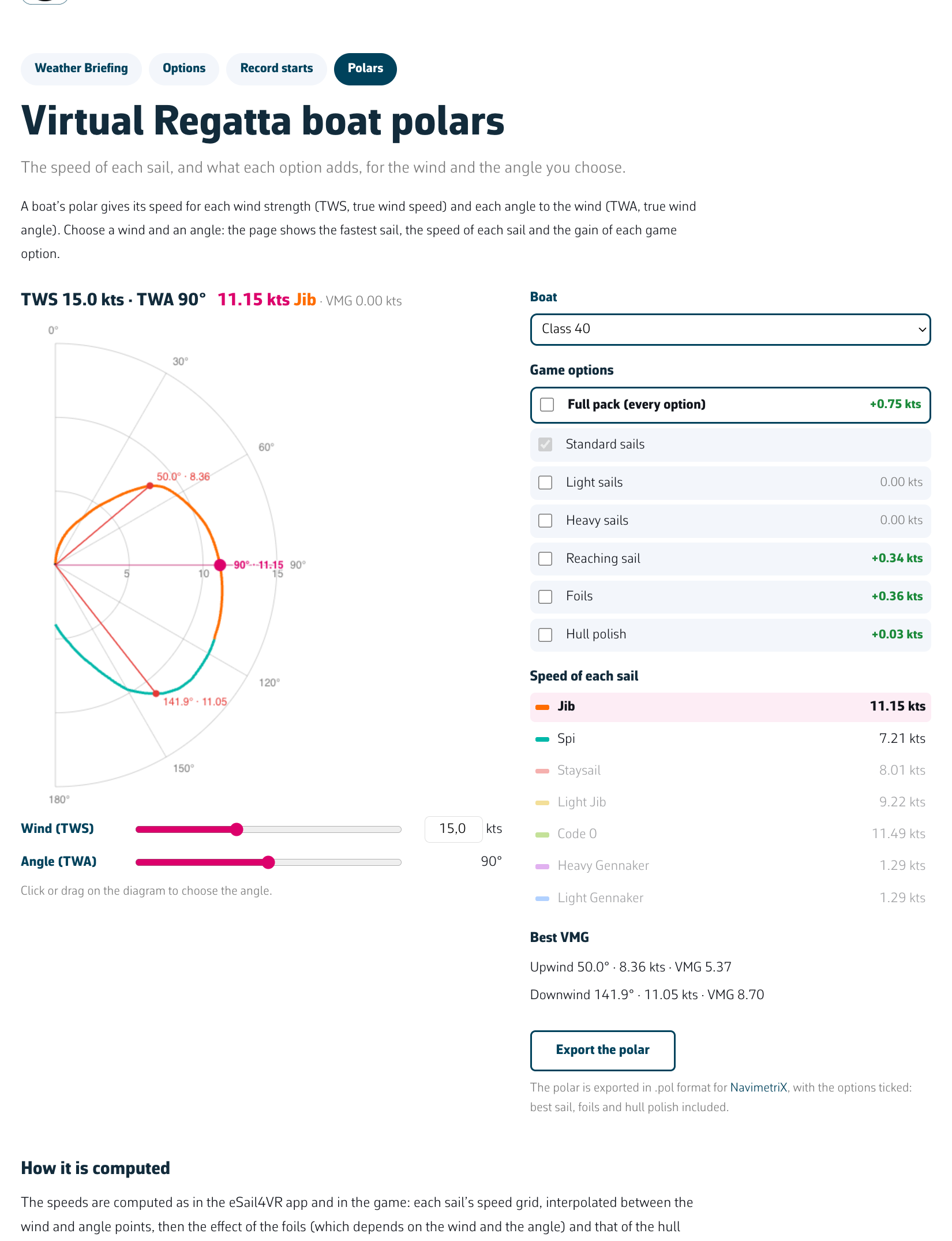 The Polars page
Which sail, and how far?
Under the polar, the “Which sail, and how far?” section answers a frequent question: up to which angle does the game keep the sail in use, without changing sails at the wrong moment?
The game changes sails by itself, but it keeps the one in use until another is at least 1.4% faster. For the chosen wind, each bar shows:
- in solid colour, the angles where the sail is the fastest;
- in a light tint, the extension where the game still keeps it, although another sail is a little faster.
Click a sail: a sentence gives its limits, for example, on the IMOCA at 20 knots of wind, “Code 0: fastest from 85.5° to 131.5°, kept by the game from 85.5° to 133.5°”, then the sail the game switches to beyond. The dashed pink line follows the angle chosen with the slider.
It helps when you programme a constant-TWA order: you see whether the target angle stays within the zone of the sail you want, or brushes a sail change. A change of wind moves these zones, so look at them at the forecast wind.
Going further
- Same calculation as the app. The speed grid of each sail is interpolated between the wind and angle points, then the effect of the foils (which depends on wind and angle) and that of the polish is added.
- Gain of an option. It is calculated at the chosen point, with the other options ticked.
- Export. The “Export the polar” button produces a .pol file with the options ticked.
- In the app. The settings panel has a “Polar” entry that opens the polar of your boat: “Curve” or “Table” view, “SAILS AND OPTIONS”, “BEST VMG”. A click or a drag on the diagram reads an angle. If the polar is not loaded, the window says “The polar of the boat is not loaded yet.”