Displayed isochrones, blue dots and pivot points
ExpertThe essentials
An isochrone is the line of the points the boat can reach at the same moment. After a routing, Expert mode lets you see them, then use them to place a pivot point: a point through which a new routing is forced to pass.
Showing the isochrones. In the left-hand drawer, “Routings” tab, tap (or click) the row of a routing: the row is tinted, an accent bar appears on its left, and its isochrones are drawn on the map. Another tap hides them. Only one routing at a time shows its isochrones.
The blue dots. On each isochrone, a blue dot marks the point closest to the target. It is the best candidate for placing a pivot.
Making a pivot routing.
- With the isochrones shown, bring a point of an isochrone under the mouse pointer (computer) or to the centre of the screen (tablet, phone). A yellow line then joins the boat to that point along the routing, and a disc marks the point: this is the chosen pivot.
- Mouse: right-click. Touch: the red "+" button.
- In the “Routing to target” window, choose the target then tap “Routing”.
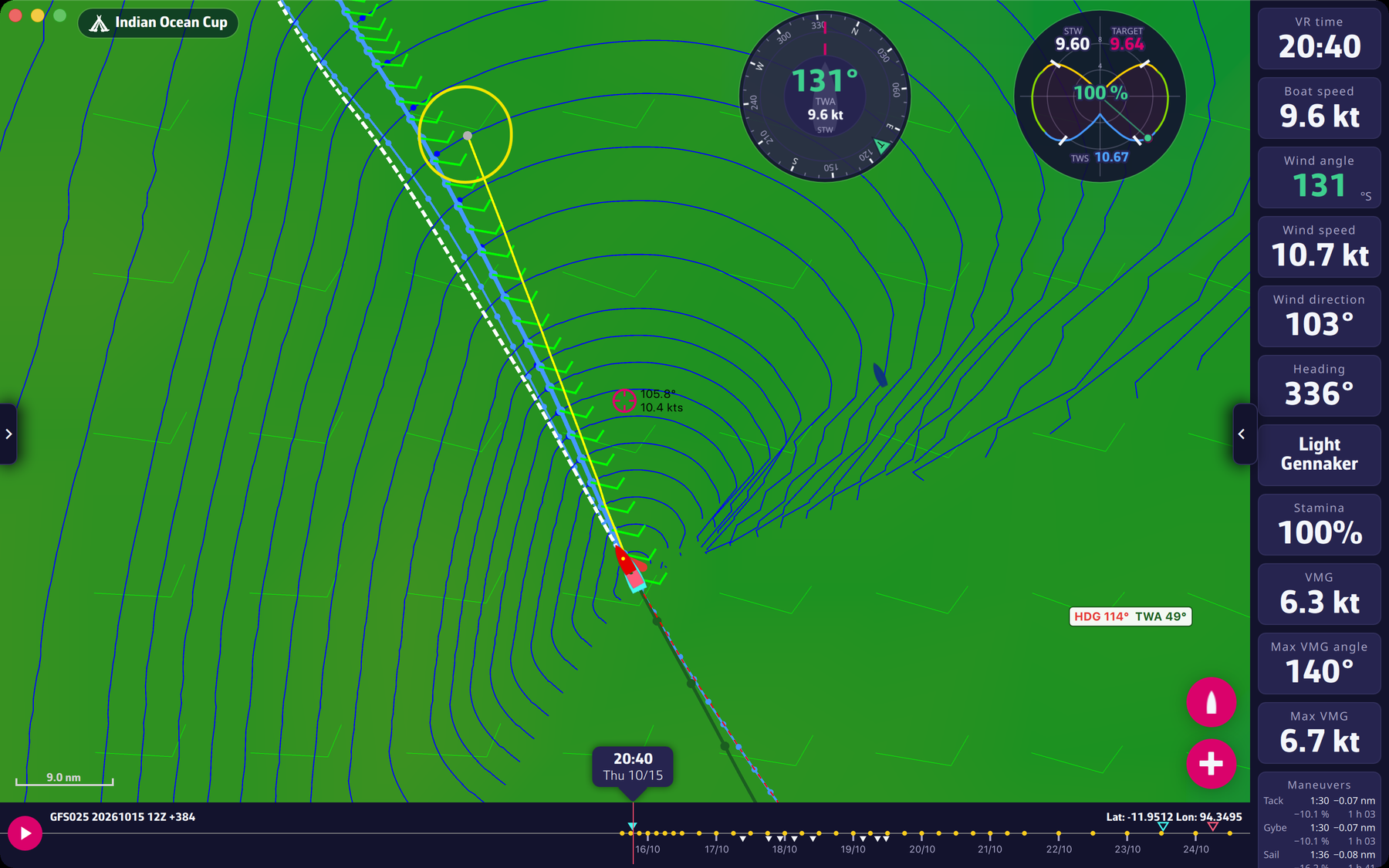 An isochrone point chosen as a pivot: yellow line from the boat to the point
Going further
Conditions. Isochrones and the pivot need Expert mode with a valid subscription. The right-click that starts the pivot routing also needs a valid subscription. If the subscription ends, the isochrones are hidden automatically.
What is a pivot for? Two uses:
- Studying a variant. What would the route be if I forced the boat through this point? Do I lose much time? Is it safer? Example: the fastest routing crosses several light-wind areas. A pivot that lengthens the route but avoids them may be worth a few minutes lost.
- Carrying on after a waypoint in VR. The new routing takes the route of the chosen routing up to the pivot, then calculates the rest up to the target.
What to do with the blue dots? If the best routing strays far from the direct route, run a second routing with a pivot on one of these blue dots. If it is very close in time to the first, following it is often a good idea.
How the point is picked. While the isochrones are shown, the app looks for the routing point closest to the pointer (or to the centre of the screen); if it is close enough, it is “picked” and the yellow line appears. The picking distance depends on the zoom level. If no point is picked, there is no pivot.
A pivot routing counts time from the pivot. For the isochrone steps, the time bands are counted from the pivot. With “Follow the course”, gates already crossed before the pivot are not taken again.
Boat position. When sending the orders of a pivot routing, the app uses the boat position of the initial routing. If it is old, the app tells you before sending: “The boat position used to calculate this routing is N min old (for a pivot routing: that of the initial routing). The boat has moved since: we advise you to calculate the routing again.”
Right-click without a pivot. When no isochrone point is picked, a right-click on a boat of the fleet, selected beforehand with a click, starts that competitor’s routing (Premium).