Turning on Expert mode
ExpertThe essentials
Expert mode opens the fine parameters of the routing calculation. It is set with a single switch:
- open the settings drawer on the right;
- choose the “Routing” section;
- turn on “Expert mode”.
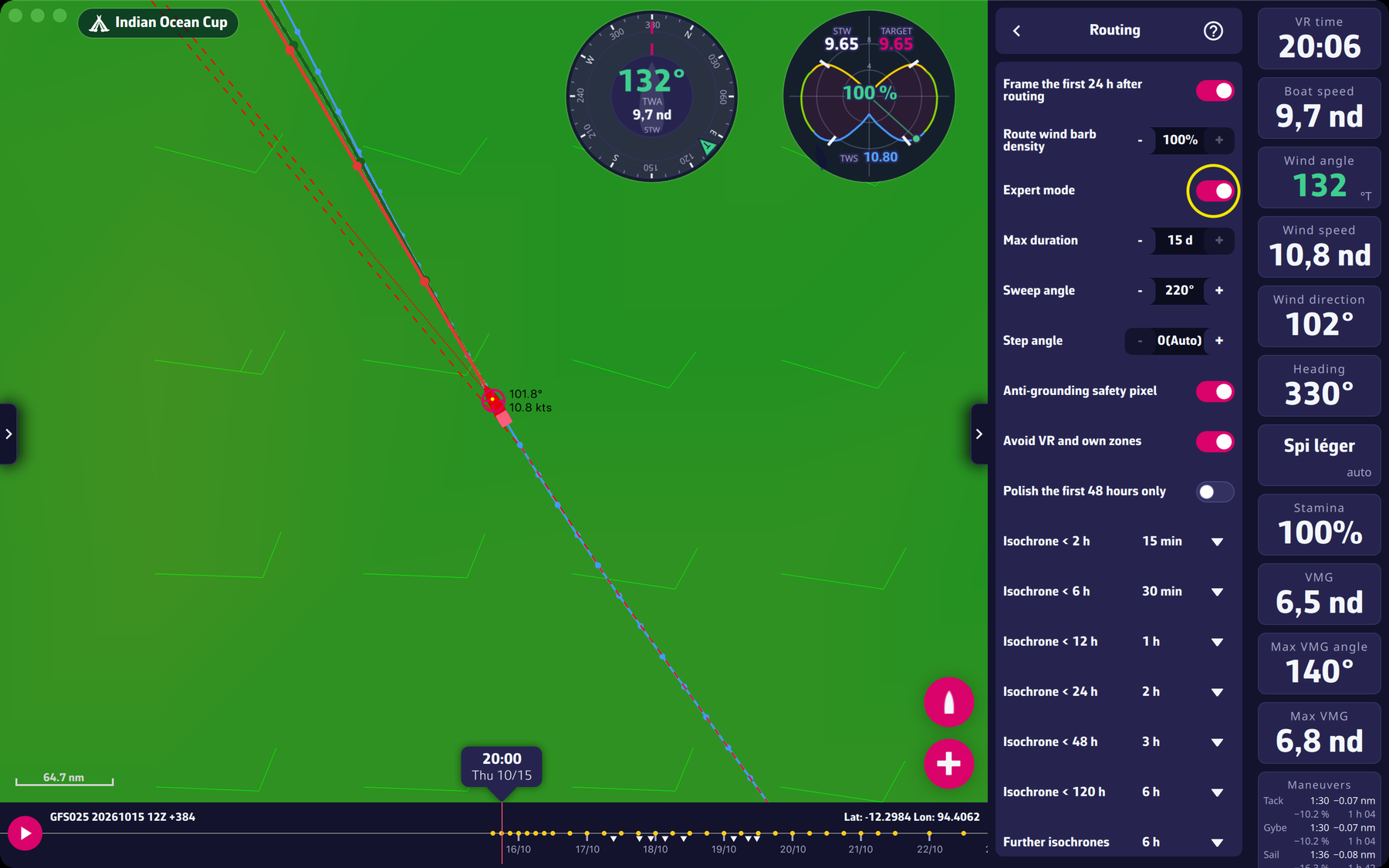 The “Expert mode” switch in Settings > Routing, and the settings it opens
A valid Premium subscription is required. Without a subscription, the switch goes back to off and a window offers you to subscribe (“Subscribe” and “Cancel” buttons). See what Premium gives.
Once on, Expert mode shows under the switch:
- “Max duration”, “Sweep angle”, “Step angle”: duration and search;
- “Anti-grounding safety pixel”: the safety pixel;
- “Avoid VR and own zones” and “Polish the first 48 hours only”: zones and polishing;
- seven settings from “Isochrone < 2 h” to “Further isochrones”: the isochrone steps;
- the “Reset routing parameters to default” button.
Outside the drawer, it also turns on the display of isochrones and pivot points and the “Follow the course” switch of the routing window.
Going further
Default values. The “Reset routing parameters to default” button puts everything back at once:
| Setting | Default value |
|---|---|
| Max duration | 15 d |
| Sweep angle | 220° |
| Step angle | Auto |
| Isochrone < 2 h | 15 min |
| Isochrone < 6 h | 30 min |
| Isochrone < 12 h | 1 h |
| Isochrone < 24 h | 2 h |
| Isochrone < 48 h | 3 h |
| Isochrone < 120 h | 6 h |
| Further isochrones | 6 h |
| Anti-grounding safety pixel | on |
| Avoid VR and own zones | on |
| Polish the first 48 hours only | off |
These values are a good starting point for nearly every case. Change one setting at a time, compare the routings you get, and go back to the defaults when in doubt.
If the subscription ends. The switch is not turned off by force: it can stay on but then has no effect. Isochrones are no longer shown, and “Follow the course” is no longer offered. Only the player turns the switch off. If the subscription only looked invalid for a moment at launch, nothing is lost.
Turning Expert mode off hides the settings but does not reset them: the values you chose stay saved, and the calculation keeps using them, whatever the position of the switch. If you want the default behaviour back, press “Reset routing parameters to default” before turning it off.
What else Expert mode changes. When the safety pixel makes a routing fail (boat or target too close to land), the message only mentions the “uncheck the safety pixel” option in Expert mode, since that is where it lives.
Why Premium? The expert tools are in the list of Premium benefits in the subscription window: “Expert routing tools”.