Reading the constant TWA and constant heading curves
BeginnerThe essentials
When they are switched on, two curves start from your boat on the map (the app calls them “lines”). Each one shows where the boat would be over the next 12 hours if you stopped touching anything, using the winds forecast by the GRIB (the wind forecast file):
- the red curve: the boat keeps its heading (the “Constant heading line” setting);
- the dark green curve: the boat keeps its wind angle, the TWA (“Constant TWA line”). The TWA is the angle between the boat’s axis and the direction the wind comes from.
Each curve carries one dot per hour. A small boat silhouette, in the same color, shows where the boat would be at the time chosen on the timeline: drag the time cursor and it moves along both curves.
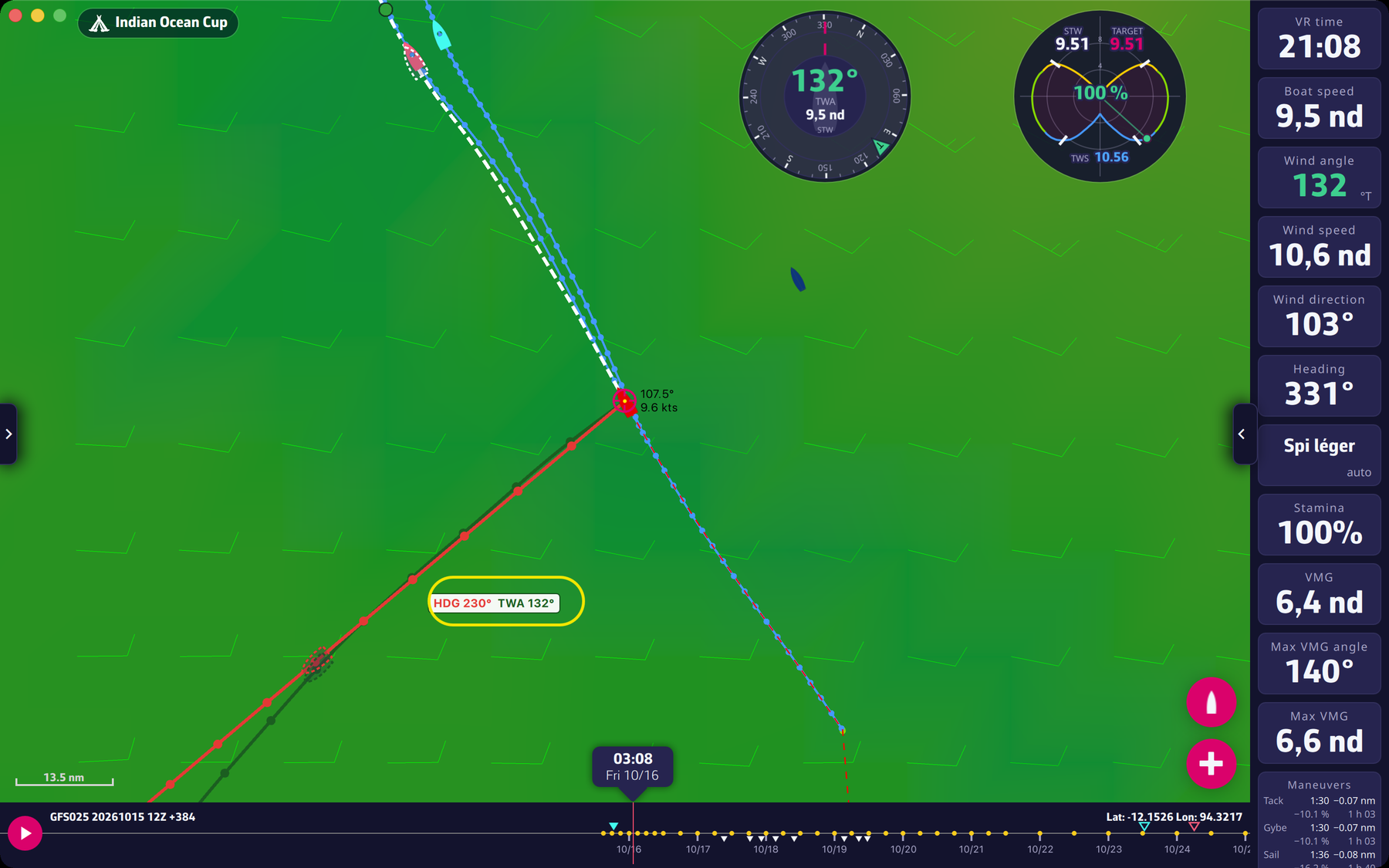 The two curves on the map, with the pointer label
To switch them on: Settings > “Display”, switches “Constant heading line” and “Constant TWA line” (see Display, language and coordinates).
With a mouse (computer). Move the pointer over the map: both curves are recalculated to pass through the pointer. A label next to the pointer gives the values to aim for, “HDG” in red and “TWA” in green. The “Line under the pointer” choice (“TWA” or “Heading”) decides which of the two passes exactly under the pointer (“TWA” by default). When the pointer leaves the map, the curves go back to the boat’s current heading and TWA.
On a touch screen. There is no pointer. The sight button, on the right of the screen, shows a cross at the center of the map: the curves then aim at the center, and you move the map under the cross.
Going further
What the simulation takes into account. The sailing is simulated in 10 minute steps, with the forecast wind at each moment and each place, your boat’s polar, the sails, the maneuver penalties and the stamina of the routing. The curve stops where the boat would stop (coast, end of the forecast).
Why the two curves separate. The wind changes over time and space. With the constant heading curve the heading does not move: it is the TWA that changes when the wind shifts. With the constant TWA curve the TWA does not move: the heading changes to follow the wind. If the forecast wind does not change, the two curves stay close. The more the wind shifts, the further apart they get.
The label and the curve under the pointer. With “TWA” as “Line under the pointer”, the constant TWA curve passes through the pointer, and the constant heading curve follows the heading in a straight line towards it. With “Heading”, the constant heading curve passes through the pointer, and the constant TWA curve keeps the TWA that this heading would give at the start, in the starting wind. The label only appears if the curves are long enough on screen (at least 60 pixels).
The time cursor. The curves do not depend on the cursor: they always start from the boat’s current position and time. The cursor only moves the silhouette, and the weather map behind (the wind shown is that of the chosen time). If the chosen time is before now or beyond 12 hours, the silhouette disappears. The curves are recalculated when the boat’s position, the polar or the GRIB change, and when the pointer moves.
While editing orders. When the order editor is open, the curves no longer follow the pointer. In Manual mode they are replaced by the line of the next leg (see Sending a manual order from the curves).
Automatic switch-on. Both curves are off by default. The app switches them on once, when it finds a Premium account; you can then switch them off.
Which one to choose? A few guidelines, to be compared with the situation and the forecast of the moment:
- If the forecast wind shifts or varies over the next hours and you want to stay at the same angle to it, the constant TWA curve follows that evolution: it is what a “TWA” order does in the game.
- If the forecast wind varies little, or if you sail near a coast or an obstacle and want a path whose direction does not change, the constant heading curve is a straight line that is easier to check on the map.
- In both cases these are forecasts: if the GRIB is wrong, the real path will differ. A constant TWA curve can also approach a coast without anything changing your heading. Look at where they go before sending.
To turn a curve into an order, see Sending a manual order from the curves.