Stuck at a mark too close to the coast
BeginnerThe essentials
The message is: “The routing is stuck at mark %1 of the course, too close to the coast. Turn off “Follow the course”, add a target and route to the target.” (%1 is the number of the mark.)
It appears when the routing follows the marks of the race course and can no longer leave mark number N: it is too close to the coast for the calculation to find a path. The app first tried to start again a little further offshore before giving up.
What to do:
- open the “Routing to target” window (red “+” button);
- switch off “Follow the course”;
- choose a target or touch “Add a target”: place it offshore of the mark, at sea;
- start the routing to this target.
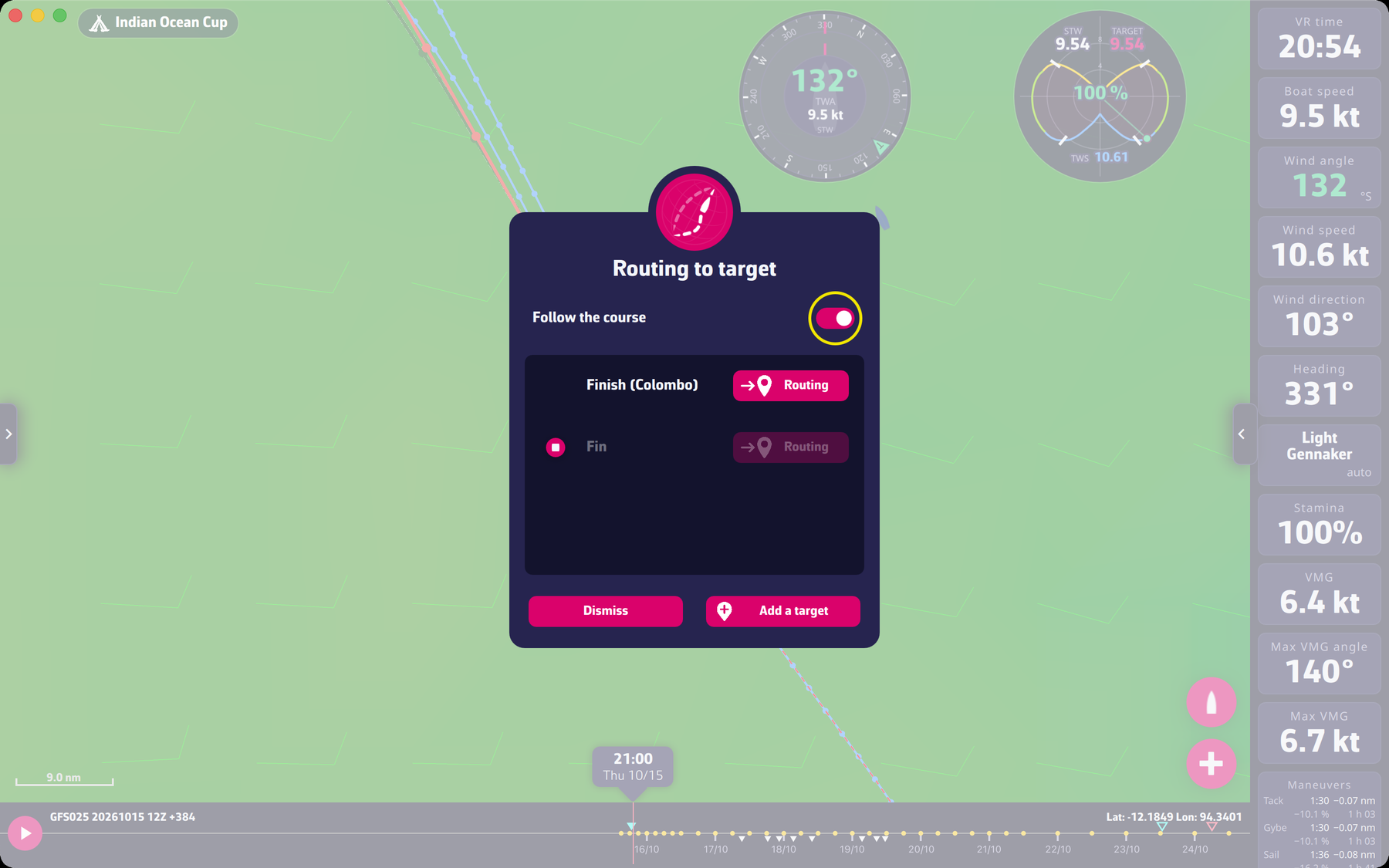 The Routing to target window with the Follow the course switch
Going further
- “Follow the course”. The switch only appears for a race whose course has marks and a finish. Switched on, it makes the routing follow the marks in order; the other targets of the list are then inactive, only the finish can be chosen.
- Why not always this message? It only comes from a block right after a mark. A block elsewhere gives the general message “no isochrone could be calculated” (see A routing that does not start).
- Safety pixel. If the target is too close to the coast, the message says to move it away or to uncheck “Anti-grounding safety pixel”. With this pixel unchecked, a point of the routing can pass within one pixel of land: the app warns that running aground remains possible.