The Zones tab
BeginnerThe essentials
The left-hand drawer has three tabs: “Fleet”, “Routings” and “Zones”. The “Zones” tab lists your own exclusion zones: polygons you draw on the map and that the routing goes around. They add to the zones Virtual Regatta (VR) imposes in some races (see VR zones).
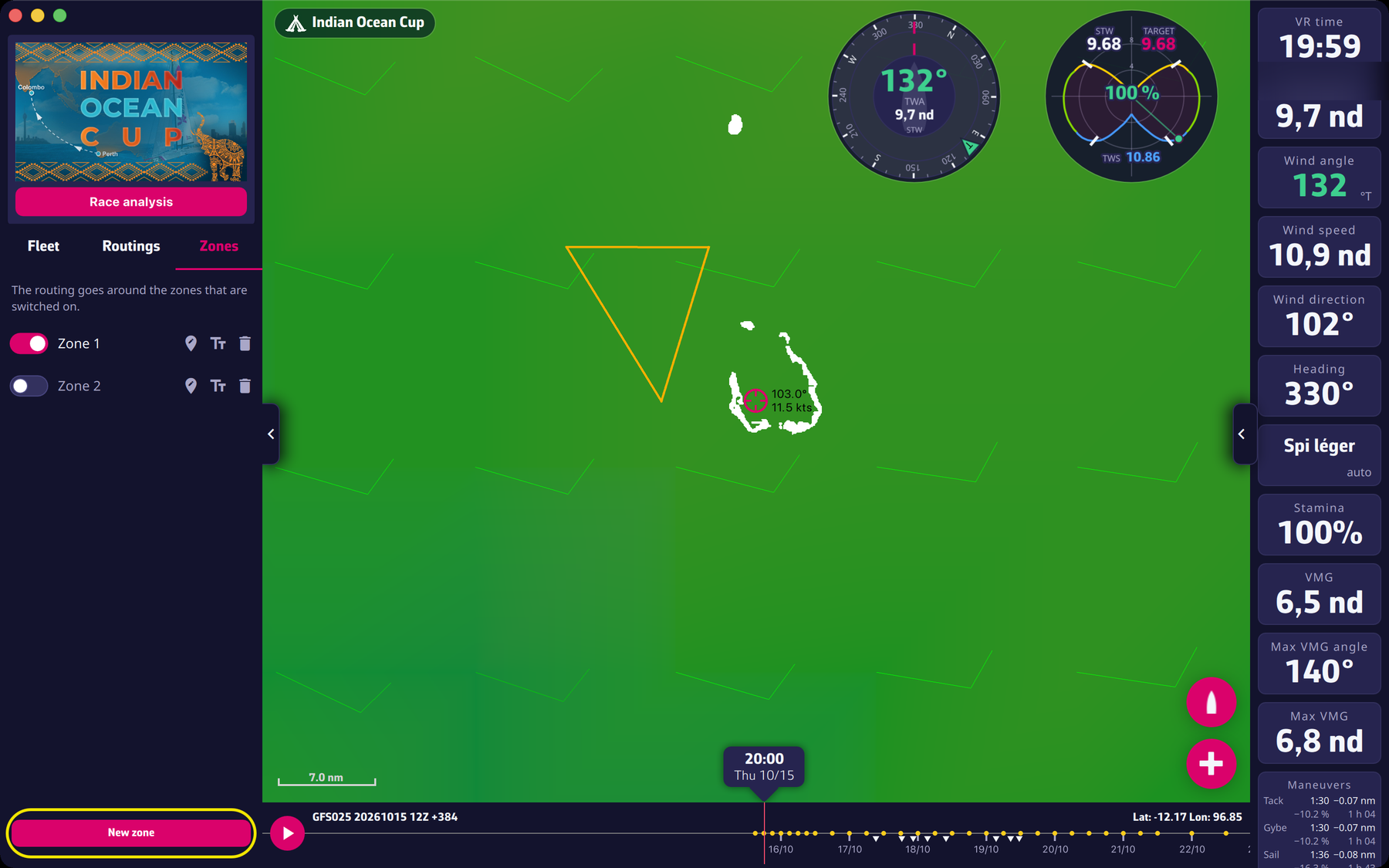 The Zones tab with two zones, one of them switched off
Each row of the list holds, from left to right:
- a switch: zone on or off. Only the zones that are switched on are drawn and avoided;
- the zone name. Tap (or click) it to centre the map on the zone;
- three icons: edit the points on the map, rename, delete.
The “New zone” button at the bottom of the tab starts the drawing (see drawing a zone).
At the top of the tab, a help text follows the situation: “Choose a race to draw its exclusion zones.” while no race is selected, “No exclusion zone for this race yet. Draw one on the map: the routing will go around it.” when the list is empty, then “The routing goes around the zones that are switched on.”
Going further
Renaming. The rename icon opens a small “Zone name” window with “Cancel” and “OK”. An empty name is refused: the old name is kept. A new zone is called “Zone 1”, “Zone 2”, and so on.
Deleting. The bin icon asks for confirmation: “Please confirm the deletion of the zone “Name””, with “Delete” and “Cancel”. Deletion is final.
A zone belongs to a race. Each zone is tied to the race and the leg (the stage, in VR) it was drawn for. The tab only shows the zones of the current race. When a race disappears from your list of races, its zones are removed with it.
While a routing is being calculated, the switches, the “edit” and “delete” icons and the “New zone” button are disabled: the routing keeps the zones it started with. Your changes count for the next routing. The “New zone” button is also disabled while no race is selected, or while a drawing is under way (it then reads “Drawing on the map…”).
Synchronisation between your devices. With a valid Premium subscription, the “eSail4VR cloud” switch on (see the display settings) and a signed-in account, the whole list of your zones is saved in the cloud. Your other devices on the same account pick it up; when the lists differ, the one changed last wins. Without these conditions, zones stay on the device where you drew them.
Your zones are yours. They are used for the routing calculation and for checking orders in eSail4VR. The app does not send them to VR, and other players do not see them.